



ParkManager Parking Management Platform
The Ultimate Solution for Managing your Parking Guidance System
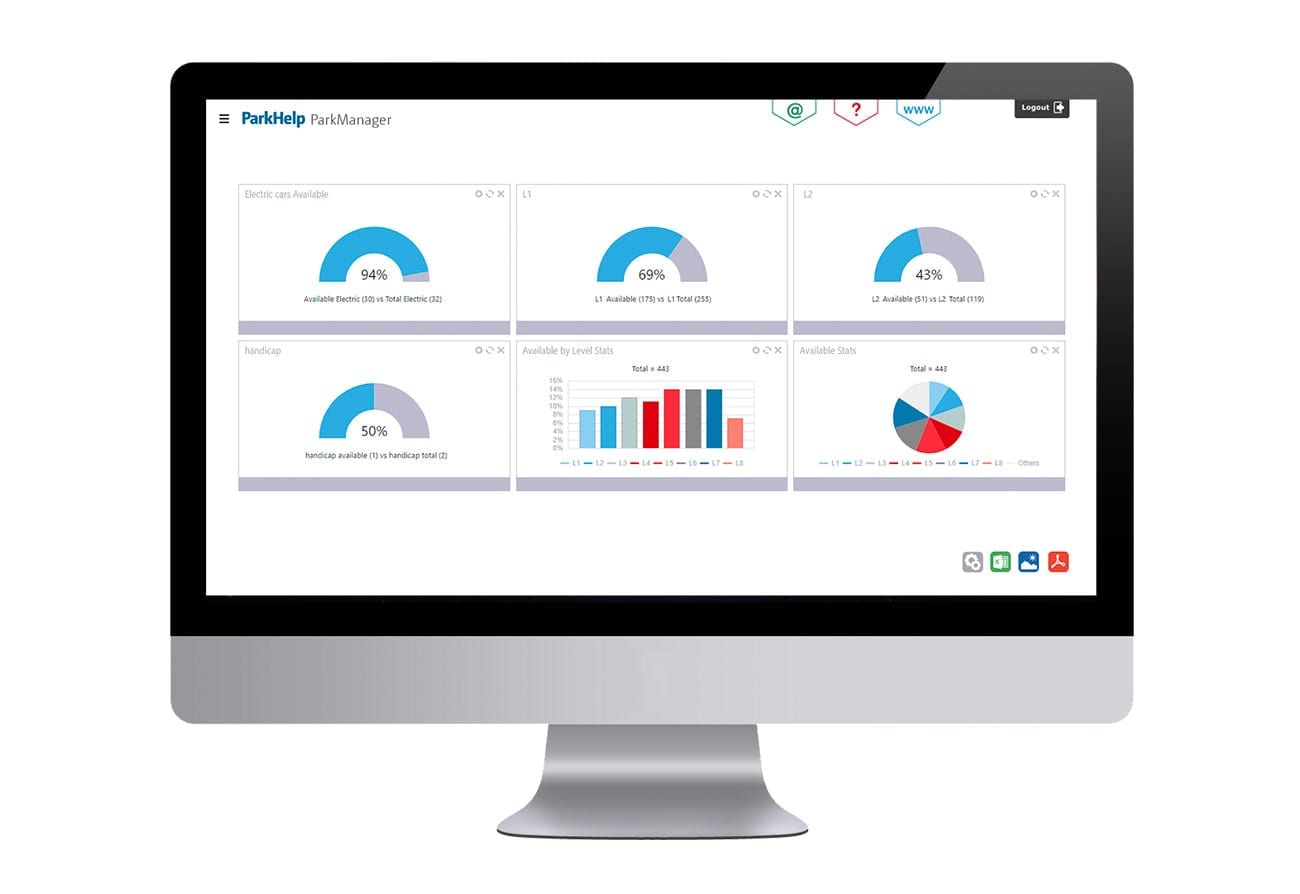
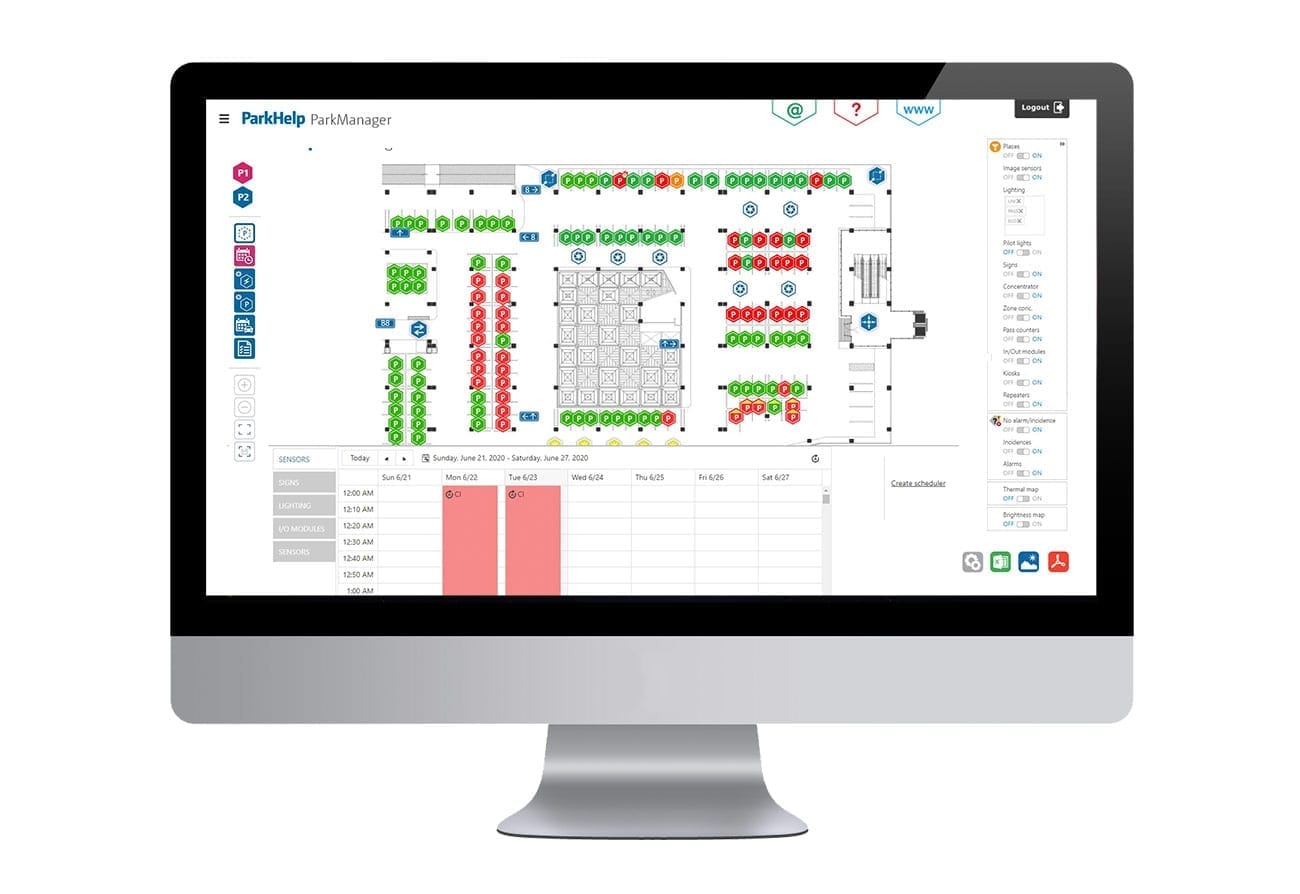
ParkManager integrates all ParkHelp technologies into a single, easy-to-use, parking management platform. Our browser-based, web application provides operators with the essential tools for managing their parking guidance system. The map-based read/write interface allows operators to monitor the overall health of the system, and allows operators to configure signs and sensors remotely. The dynamic and customizable reporting dashboards record real-time data and provide valuable insights for facility optimization.
Loading...
-
Map-based Graphic User Interface
-
Dynamic & Customizable Reporting
-
Real-time Dashboards
-
Fully Integrated with All ParkHelp Sensors
Key Features
- Seamless experience regardless sensor technology. Unified map GUI, where you can manage all your parking, mixing sensors (Infrared, Ultrasonic, Camera based, outdoor wireless & pass counters)
- Guidance: Basic functions to operate and manage ParkHelp’s PGS Solutions: visualize the state of occupancy and rotation, force state/color of the pilots, schedule opening hours, set alarms for overstay or temperature.
- Lighting: Operates and manages Lighting solutions: turn on and off, control intensity, schedule the lighting functions.
- Camera: Basic security functions provided by the Camera-based units. Video on demand, surveillance functions, and access to stored video events. Browse by plate, time or space.
- Access control and identification: Functions to manage black/white/custom lists. Create group lists based on LPR to increase the control of your parking facility, detect breaches and infringements, and create group lists to apply different fares.
- Find your Car: advanced car-finding functions using LPR.
- Open API: Integrate ParkHelp’s ParkManager with third party systems, easily thanks to provided API.
Key Functionality
- Customizable Dashboard. KPI’s of the user’s choice at one glance. Choose between different types of graphics you want ParkManager to show.
- Map View: View of different levels and zones of the parking facility layout. Interact with every element (sensor/pilot, light, display…)
- Statistics: Visualize and review a wide range of KPIs (Occupation, rotation, rankings, lighting consumption, etc.) and export them to Excel, PDF and PNG (graphics).
- Reports: customize and schedule reports about parking events happening inside the facility, like entrance/exit lists, incidence list, occupation list and overstay list.
- Signages: A specific tab to control the signages which are placed outside the parking facility. Visualize configuration, status, displayed value or choose the brightness level.
- Find-your-car: Locate specific License Plates within the facility, create black/white lists, define groups, rules, and events in case LPR cameras or Camera-based Parking sensors are installed.
- Image Wall: if the parking facility is equipped with a camera-based parking guidance system, it provides a visual interface with a matrix style with unobstructed view of parking bays up-to-date images.
- Events: Obtain real-time notifications of relevant events inside your facility, like specific parking information or alerts, occupancy alarms or system errors.
- Video Events: Shows real-time information of relevant events caught on video. Browse events by space or License plate.
- Configuration: Based on the user role/profile, a set of configuration options are provided: general configuration options, manage users and their profiles, alarms or statistics email notifications, incidents reporting options, etc.
- Scheduler: Automate your parking needs, without human intervention
Detailed Statistics
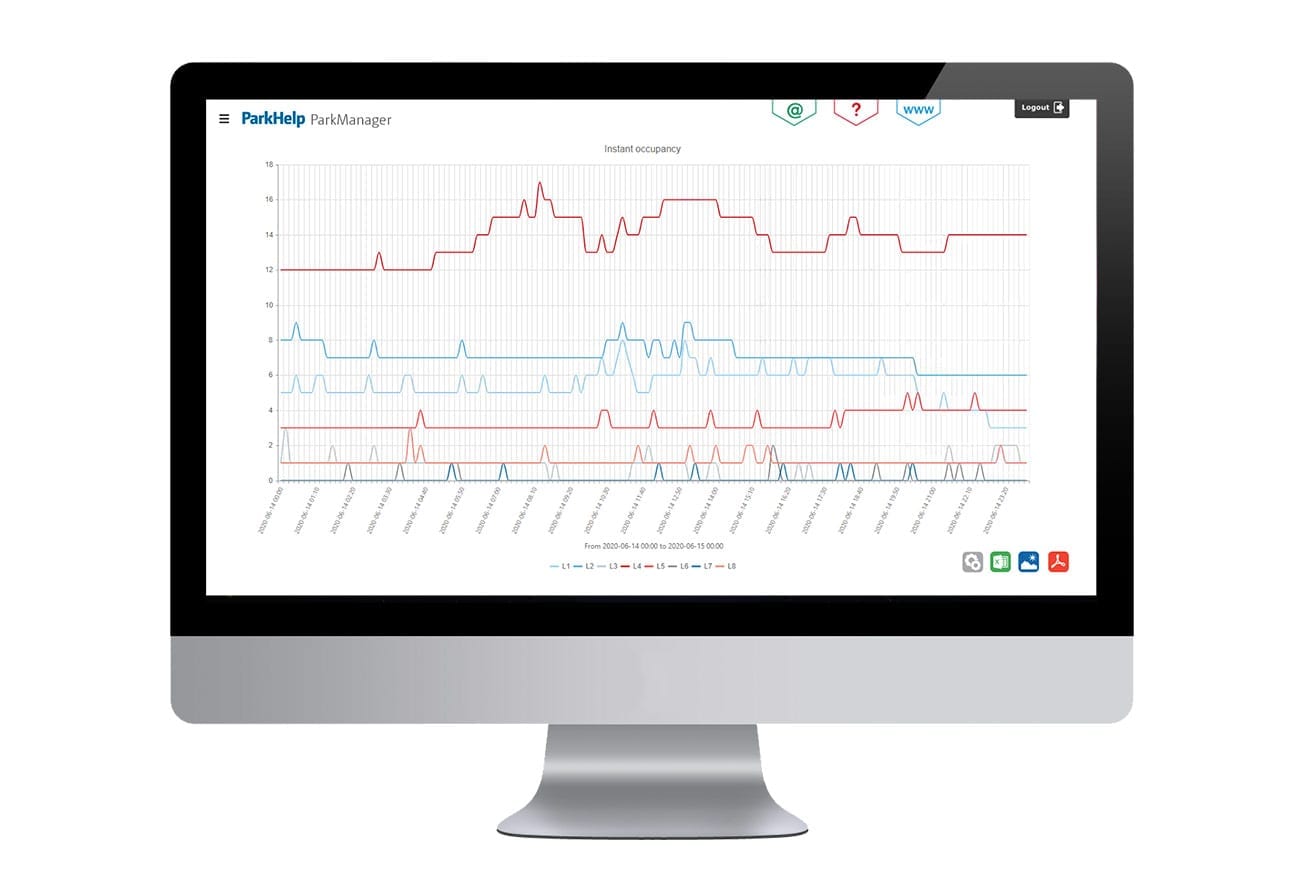
- Instant occupation: The instant occupation stat shows the exact occupancy level of the parking, displayed in ranges of 10 minutes, and returns an evolution of the occupancy throughout the day.
- Average occupation: this feature calculates the average of all instant occupation values per day, and compares it to the total number of spaces available to provide a percentage of average occupation per day.
- Maximum occupation: shows the maximum occupancy level each day.
- Maximum occupation/hour: delivers the maximum occupancy level each hour.
- Rotations per day: this feature shows the number of times a parking space has been occupied and released within one day.
- Rotations per hour: the number of times a parking space has been occupied and released within one hour.
- Rotation index: number of rotations against the number of parking spaces to indicate how many times the group spaces have been rotated.
- Ranking occupation (rotation) This feature shows which parking spaces have experienced most rotations in a certain period of time.
- Total occupation time: summation of the total occupancy time of parking spaces of a space group (level, or manually set groups)
- Average time of occupancy: shows the average duration of the stay of your parkers in a day. Total occupation time/rotations.
- Lighting consumption: shows the consumption of the lighting group installations.
- Temperature map: The temperature map shows a thermal map of the parking floor by level, indicating easily sources of excessive heat.
- Brilliancy/Light map (for lighting): map of the brightness on the level of the parking lot. This is a visual aid to control the brightness of the lighting in the area.
- Incidence lists: detects if there are failures in different parking elements or the communication with the system.
Reports
- Entrance/Exit: reports about the number of vehicles detected by a group of pass counters or LPR camera in a set period of time.
- Incidences: Generates a list of incidences for the different elements (sensors, pilots, displays, data concentrators, etc.): timeout, overstay, temperature.
- Occupancy list reports: Generates a list of reports about the occupancy status of the different groups of spaces.
- Overstays: Alerts of overstay or of abandoned vehicles.
Customers Who Trust ParkHelp
























“Tenant retention is probably double…. Very few were lost after the improvements were there because very few buildings have all the amenities and sophistication. The property was actually better than brand-new because they never had that kind of parking advantage before.”
Director of CBRE Global Investors - Galleria Dallas
“At many of the other parking facilities [on the property], the parking systems are turned off. The gate arms are up, they don’t operate because they might be closed when they ought to be open, so they just turn them off and leave the gates up. Or they’re on, and everybody knows that the car counts are wrong.”
Project Manager - Walter Reed Medical Center
“Ultimately, it was worth the wait, the parking industry is a very fast-paced business. We had to find a system that would keep up with (or a step ahead of) continuously evolving parking technology and would not be outdated by the time all of the systems were installed.”
Senior Director of Countywide Parking Management - LA Metro
“We’re trying to make it more efficient, providing more information for them instead of driving around and around looking for a space, we’d rather have them studying and enjoying the student life.”
Associate Vice Chancellor of Facilities - University of Washington Bothell
“The reason we decided to install a metering system is that we only have space for about 327 cars, and we have at least 700 employees. People would drive around the garage not knowing if there were any spots available. We incorporated a display board which is right by our main entrance to notify if the garage is full. It did solve the issue that we had.”
Construction Supervisor - Howard Hughes Medical Institute
“Accuracy is critical… because, as a military medical facility, there are so many handicapped people who come to the medical center. Being able to know exactly where the handicapped spots are is really useful.”
Project Manager - Walter Reed Medical Center
“This system is more accurate. The other systems are not telling you the truth. If you see a sign out there that says there are 22 spaces available, there might only be two spaces available. They don’t count the cars in and out as accurately as this one does partially because this system is more wireless and is available to monitor better because you don’t have to have as much physical infrastructure.”
Project Manager - Walter Reed Medical Center
We Can Solve Your Parking Facility Challenges
We Can Solve Your Parking Facility Challenges